
What Is Rytr?
Rytr is a template-driven AI writing assistant: you pick a use case (blog outline, product description, email, ad copy, and so on), choose a tone of voice, add a short prompt, and it generates a draft in seconds. It launched in 2021 and has grown into one of the more widely used budget AI writers, with reviewers citing user counts in the millions. Unlike an open chat interface, Rytr is built around 40+ structured templates, which makes it fast to pick up, but less flexible than a general-purpose model for open-ended writing.
How Rytr Actually Works
The setup is genuinely simple, which is a real selling point for non-technical solo creators:
- Create an account (no credit card required for the free plan).
- Pick a language, a tone (Formal, Casual, Convincing, Humorous, and 15+ others), and a use case.
- Add a short prompt or primary keyword.
- Generate — Rytr produces several variants to choose from.
- Refine with the built-in editing tools before exporting.
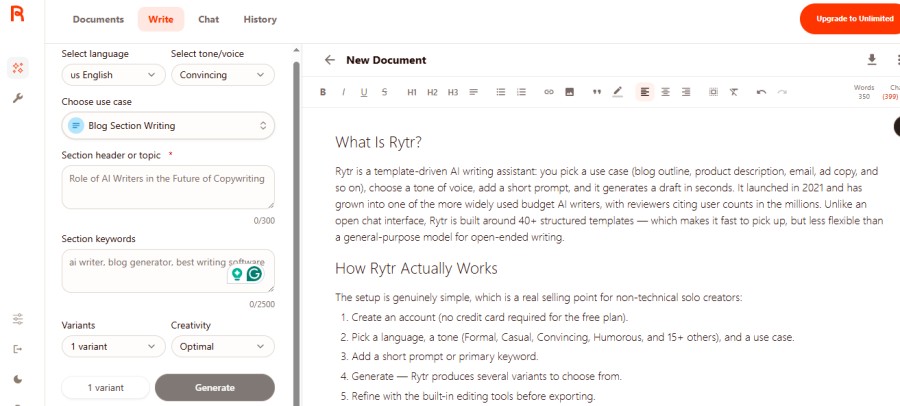
Those editing tools are arguably Rytr’s most practically useful feature set, more so than raw generation:
- Rewrite — restructures existing text while preserving meaning
- Improve — polishes phrasing and fixes awkward sentences
- Expand — adds length and detail to a short passage
- Autocomplete — picks up mid-sentence or mid-paragraph to keep your own writing moving
Multiple reviewers flag these as a “hidden gem” — they work better on human-written drafts you’re refining than as a way to generate a finished article from nothing.
Key Features
- 40+ use-case templates, covering blog outlines, ad copy, product descriptions, email, social captions, and structured copywriting frameworks (AIDA, PAS)
- 20+ preset tones, plus custom tone matching on paid plans
- Multi-language support — one language on Free and Unlimited, 35+ on Premium
- Plagiarism checking (Copyscape-powered) on paid plans
- Chrome extension for writing inside Gmail, Google Docs, or WordPress
- Basic AI image generation — described across reviews as fine for placeholder visuals, not a substitute for a dedicated image tool
- Basic SEO/keyword support — enough for light on-page guidance, not a replacement for a dedicated SEO tool like Surfer or Frase
Rytr Pricing in 2026
| Plan | Monthly | Annual (per mo.) | What you get |
|---|---|---|---|
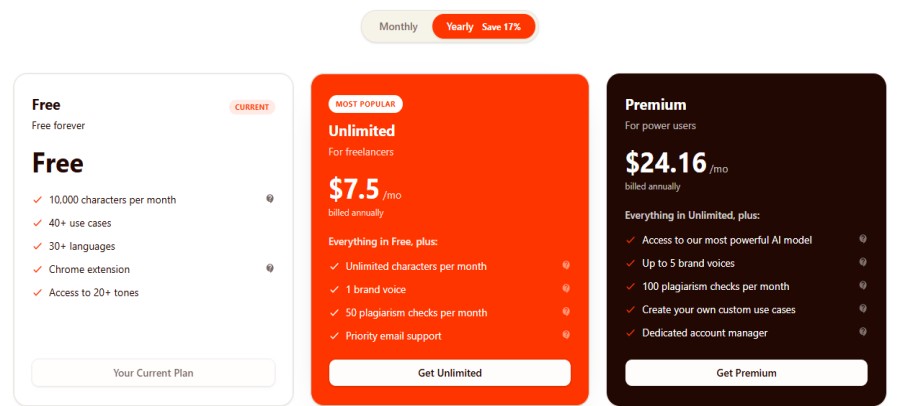
| Free | $0 | — | 10,000 characters/month, 40+ use-case library, 1 language |
| Unlimited | $9 | $7.50 | Unlimited generation, Chrome extension, ~50 plagiarism checks/mo, 1 brand voice, Priority email support |
| Premium | $29 | $24.16 | Everything in Unlimited, plus: Up to 5 brand voices, ~100 plagiarism checks/mo., Dedicated account manager |
👉 Start free on Rytr → — no credit card required, so you can test the templates and tone control yourself before deciding on a paid tier.
Output Quality: Short-Form vs. Long-Form (The Honest Part)
This is where a lot of reviews get vague, so here’s the direct version: Rytr’s quality depends heavily on the length of what you’re asking for.
- Short-form (ads, captions, subject lines, product descriptions): Consistently rated well across reviews — fast, on-tone, usually requires light editing only.
- Long-form (full blog articles): Reviewers are fairly unanimous that tone coherence and depth degrade as the piece gets longer. Rytr is described repeatedly as “a writing assistant, not a research assistant” — good for outlines, intros, and section starters, weaker at carrying original insight across 1,500+ words unaided.
If your content plan is mostly long, research-heavy articles, plan to use Rytr for the outline and first-draft scaffolding, then do the heavy lifting yourself (or with a tool built specifically for long-form SEO content).
Pros and Cons
Pros
- One of the cheapest unlimited-generation plans on the market ($7.50–$9/month)
- Genuinely usable free plan for testing before you pay
- Large template library removes the “blank page” problem for common formats
- Rewrite/Improve/Expand tools are effective for polishing existing drafts
- Simple enough to learn in under an hour — no prompt-engineering skill needed
- Chrome extension is a real convenience for writing across the web
Cons
- Free plan’s 10,000-character cap is tight — a single 1,500-word draft can use most of it
- Long-form output needs significant human editing to reach publishable quality
- No native Zapier integration or WordPress plugin
- Some Trustpilot reviewers report billing issues after cancellation — worth reading the cancellation policy before you subscribe
- SEO features are basic compared to dedicated tools
Rytr vs. the Alternatives
| Tool | Starting price | Best for | Weaker at |
|---|---|---|---|
| Rytr | $7.50–$9/mo | Fast short-form copy on a budget | Long-form, research-heavy content |
| ChatGPT Plus | $20/mo | Flexible long-form writing, reasoning, and editing | No pre-built templates — needs prompt skill |
| Jasper | ~$59/mo | Teams needing brand-voice consistency at scale | Price, for solo creators |
Who Should (and Shouldn’t) Use Rytr
Good fit if you’re a solo creator who:
- Needs fast blog outlines, product descriptions, ad copy, or social captions
- Wants to test AI writing without committing to a $40+/month tool
- Already writes your own drafts and mainly wants help polishing/expanding them
Probably not a fit if you:
- Publish long-form, research-heavy articles as your core content
- Need deep SEO tooling built in (pair Rytr with a dedicated SEO content tool instead)
- Want one tool that fully replaces a writer rather than assisting one
Final Verdict
Rytr earns its reputation as one of the most affordable, easy-to-use AI writing tools for solo creators handling short-form content — not because it’s the most powerful model available, but because it does a narrow job well at a genuinely low price. If your workload is mostly quick-turnaround copy, the free plan costs nothing to test and the Unlimited plan is a low-risk upgrade. If your workload is long-form articles, treat Rytr as an outlining and polishing tool rather than your primary writer.
FAQs
Is Rytr free to use?
Yes. Rytr’s Free plan gives you 10,000 characters per month, access to its use-case templates, and preset tones, with no credit card required — enough to test whether it fits your workflow before paying.
How much does Rytr cost?
Rytr’s Unlimited plan is $9/month ($7.50/month billed annually), and Premium is $29/month ($24.16/month billed annually). Pricing and limits can change, so it’s worth confirming current details on Rytr’s official pricing page before subscribing.
Is Rytr good for SEO blog content?
It’s useful for outlines, intros, and section starters. It’s not built to carry a full long-form SEO article on its own — plan on human editing or a dedicated long-form tool for that job.
Is Rytr better than ChatGPT?
They serve different needs. Rytr is faster for structured, repetitive short-form tasks thanks to its templates. ChatGPT is more flexible for long-form writing and complex editing, at a higher starting price ($20/month vs. Rytr’s $7.50–$9/month).
Does Rytr have a plagiarism checker?
Yes, on paid plans, powered by Copyscape — around 50 checks/month on Unlimited and 100/month on Premium, per current plan details.